Mod Configuration Options
It is highly recommended that you install Mod Menu to configure the mod
Player Custom Configuration Options
Configuration file path: config\shape-shifter-curse-client-custom.toml
-
keep_original_skin = trueWhether to keep your original skin -
enable_form_color = trueWhether to enable form color customization feature -
primaryColor = 13822450Primary color of the form The value of this color is the decimal value converted from hexadecimal color It is recommended to install ModMenu to directly configure Hex colors intuitively in the game -
accentColor1Color = 8967367Accent color 1 of the form -
accentColor2Color = 7829367Accent color 2 of the form -
eyeColor = 1118481Eye color of the form. Only takes effect on forms where eye color is overridden -
primaryGreyReverse = falseWhether to reverse the grayscale value of the primary color The custom colors of forms will be mixed with the grayscale texture of the original texture to achieve a more natural effect -
accent1GreyReverse = falseWhether to reverse the grayscale value of accent color 1 -
accent2GreyReverse = falseWhether to reverse the grayscale value of accent color 2
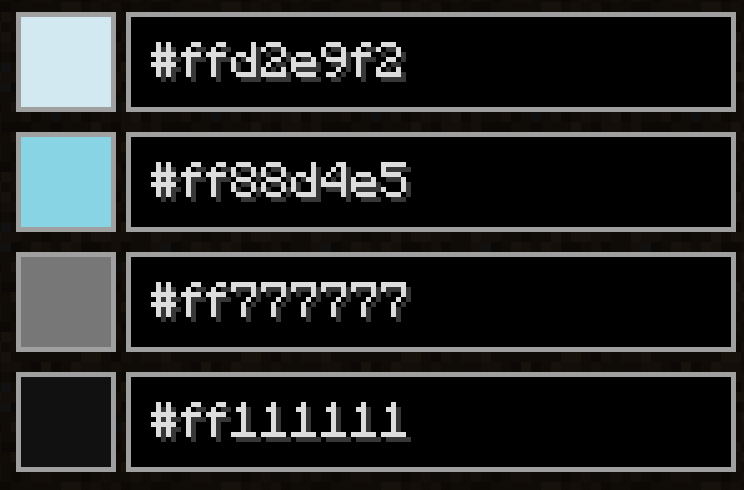
In the Form Color Config after 1.0.73, the alpha channel (first two digits in the Hex color code) determines whether the original texture color of the form should be overwritten. Only FF and 00 are accepted as input.
If set to 00, the corresponding region will retain its original texture color.
If set to FF, the color you specify will fully replace the original texture color.
You can use this alpha channel setting to achieve effects like only modifying eye color while keeping the rest of the texture unchanged.
Client-Side Configurations
Configuration file path: config\shape-shifter-curse-client.toml
-
enableFormModelOnVanillaFirstPersonRender = trueDetermines whether to render arm models of different forms in vanilla first-person view
If experiencing frame drops in first-person view, recommended to set to false
-
newStartBookForBiggerScreen = falseWhether to enable the enlarged version of the Book of Shape Shifter pages
Recommended to set to true when playing on high-resolution displays where UI appears too small
Server-Side Common Configurations
Configuration file path: config\shape-shifter-curse-common.toml
-
transformativeBatSpawnChance = 0.5Sets the spawn probability of Cursed Bats
-
transformativeAxolotlSpawnChance = 1.0Sets the spawn probability of Cursed Axolotls
-
transformativeOcelotSpawnChance = 0.67Sets the spawn probability of Cursed Ocelots
-
enableNewStartBook = trueWhether to enable the new version of the Book of Shape Shifter pages
Enabled by default. Set to false to use the legacy version of the book pages
Note: Legacy version requires owo-lib mod to function properly
-
curseMoonPhase = [1, 5]Configure the moon phases when the Cursed Moon event takes effect, with a value range of 0-7. Default value is moon phase 1 and moon phase 5.
When the values in the array are cleared, i.e., configured as "curseMoonPhase = []", the Cursed Moon event will be disabled.
This is useful for creating modpacks that focus on a specific form.
-
allowSleepInCursedMoon = falseAllow sleep during Cursed Moon event,Default value is false.
If set to true, your form will revert to form before Cursed Moon event upon waking up.